> ## Documentation Index
> Fetch the complete documentation index at: https://docs-staging-fix-details-to-accordion-universal-components.mintlify.site/llms.txt
> Use this file to discover all available pages before exploring further.

> Learn how to configure an update policy form using Forms for Actions for users to review and accept new terms of service or consent updates.

# Use Cases: Configure an update policy form using Forms

<Card title="Before you start">
  1. Create a [Machine-to-Machine Application](/docs/get-started/auth0-overview/create-applications/machine-to-machine-apps) with the following scopes enabled:

  * `read:users`
  * `update:users`
  * `create:users`
  * `read:users_app_metadata`
  * `update:users_app_metadata`
  * `create:users_app_metadata`

  2. Add a [Vault connection](/docs/customize/forms/vault) using the M2M application credentials.
</Card>

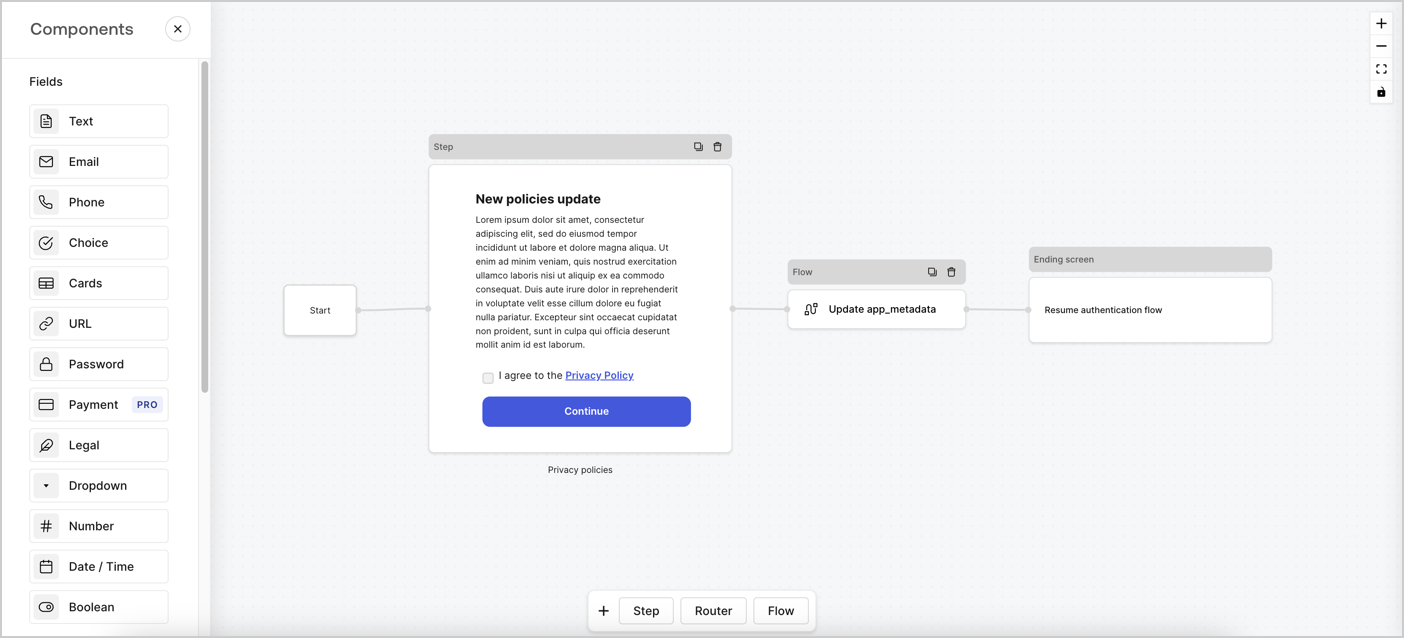
Forms for Actions allows you to create custom privacy policies flows and store the consent under the `app_metadata` object.
<Frame>
  <img src="https://mintcdn.com/docs-staging-fix-details-to-accordion-universal-components/hBi-kIKnqSz3KDdt/docs/images/cdy7uua7fh8z/6i68dMvHDTijfRmSgN1x8Q/ad900e7d4c0fb34645921435472b8684/privavy-policy-form.png?fit=max&auto=format&n=hBi-kIKnqSz3KDdt&q=85&s=41a632a8fa017d2d8e3448e405635db3" alt="Dashboard > Actions > Forms > Privacy policy use case" data-og-width="1404" width="1404" data-og-height="638" height="638" data-path="docs/images/cdy7uua7fh8z/6i68dMvHDTijfRmSgN1x8Q/ad900e7d4c0fb34645921435472b8684/privavy-policy-form.png" data-optimize="true" data-opv="3" srcset="https://mintcdn.com/docs-staging-fix-details-to-accordion-universal-components/hBi-kIKnqSz3KDdt/docs/images/cdy7uua7fh8z/6i68dMvHDTijfRmSgN1x8Q/ad900e7d4c0fb34645921435472b8684/privavy-policy-form.png?w=280&fit=max&auto=format&n=hBi-kIKnqSz3KDdt&q=85&s=8bf08226f588fd78b65aea7b26d9183f 280w, https://mintcdn.com/docs-staging-fix-details-to-accordion-universal-components/hBi-kIKnqSz3KDdt/docs/images/cdy7uua7fh8z/6i68dMvHDTijfRmSgN1x8Q/ad900e7d4c0fb34645921435472b8684/privavy-policy-form.png?w=560&fit=max&auto=format&n=hBi-kIKnqSz3KDdt&q=85&s=301c0fce0faba66d87f9a0f4508454ca 560w, https://mintcdn.com/docs-staging-fix-details-to-accordion-universal-components/hBi-kIKnqSz3KDdt/docs/images/cdy7uua7fh8z/6i68dMvHDTijfRmSgN1x8Q/ad900e7d4c0fb34645921435472b8684/privavy-policy-form.png?w=840&fit=max&auto=format&n=hBi-kIKnqSz3KDdt&q=85&s=de407b003aa6fe3248ac036debdda75e 840w, https://mintcdn.com/docs-staging-fix-details-to-accordion-universal-components/hBi-kIKnqSz3KDdt/docs/images/cdy7uua7fh8z/6i68dMvHDTijfRmSgN1x8Q/ad900e7d4c0fb34645921435472b8684/privavy-policy-form.png?w=1100&fit=max&auto=format&n=hBi-kIKnqSz3KDdt&q=85&s=258aff247b4e66b86e2a65ea32b859f9 1100w, https://mintcdn.com/docs-staging-fix-details-to-accordion-universal-components/hBi-kIKnqSz3KDdt/docs/images/cdy7uua7fh8z/6i68dMvHDTijfRmSgN1x8Q/ad900e7d4c0fb34645921435472b8684/privavy-policy-form.png?w=1650&fit=max&auto=format&n=hBi-kIKnqSz3KDdt&q=85&s=25ae8e407b027777ff09c8d1ca7349e4 1650w, https://mintcdn.com/docs-staging-fix-details-to-accordion-universal-components/hBi-kIKnqSz3KDdt/docs/images/cdy7uua7fh8z/6i68dMvHDTijfRmSgN1x8Q/ad900e7d4c0fb34645921435472b8684/privavy-policy-form.png?w=2500&fit=max&auto=format&n=hBi-kIKnqSz3KDdt&q=85&s=47fa89f43488305b79347b1b2071ed5b 2500w" />
</Frame>

The sections below outline how you can create an Update Policy form using nodes and flows, along with steps for adding your form to a [Post Login](/docs/customize/actions/explore-triggers/signup-and-login-triggers/login-trigger) Action.

## Create a form from scratch

Follow these steps to create a form to gather information:

1. Open the Form editor by selecting **Auth0 Dashboard > Actions > Forms.**
2. Select **Create Form** > **Start from scratch**.

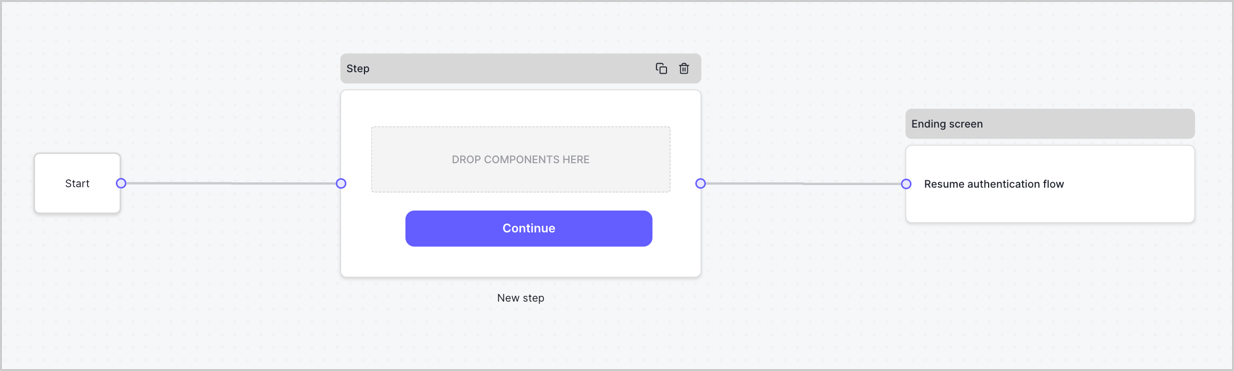
By default, a new form contains a Start node, a Step node, and an Ending screen node.
<Frame>
  <img src="https://mintcdn.com/docs-staging-fix-details-to-accordion-universal-components/IUh6-Vzwx_T82DPb/docs/images/cdy7uua7fh8z/2TZ9jSjgEcARFpULI6hz4R/a4319a1bd482f2ee5cc23100fdb2f42c/New-form-Forms-for-action-use-case.png?fit=max&auto=format&n=IUh6-Vzwx_T82DPb&q=85&s=8f8330fb247b78837bc801d3d540568e" alt="Dashboard > Forms > Use Cases > Form" data-og-width="1234" width="1234" data-og-height="371" height="371" data-path="docs/images/cdy7uua7fh8z/2TZ9jSjgEcARFpULI6hz4R/a4319a1bd482f2ee5cc23100fdb2f42c/New-form-Forms-for-action-use-case.png" data-optimize="true" data-opv="3" srcset="https://mintcdn.com/docs-staging-fix-details-to-accordion-universal-components/IUh6-Vzwx_T82DPb/docs/images/cdy7uua7fh8z/2TZ9jSjgEcARFpULI6hz4R/a4319a1bd482f2ee5cc23100fdb2f42c/New-form-Forms-for-action-use-case.png?w=280&fit=max&auto=format&n=IUh6-Vzwx_T82DPb&q=85&s=0b17a12406a94dc6479b026ffeaf3043 280w, https://mintcdn.com/docs-staging-fix-details-to-accordion-universal-components/IUh6-Vzwx_T82DPb/docs/images/cdy7uua7fh8z/2TZ9jSjgEcARFpULI6hz4R/a4319a1bd482f2ee5cc23100fdb2f42c/New-form-Forms-for-action-use-case.png?w=560&fit=max&auto=format&n=IUh6-Vzwx_T82DPb&q=85&s=39716ae0e62e22a4f0e29310a2260672 560w, https://mintcdn.com/docs-staging-fix-details-to-accordion-universal-components/IUh6-Vzwx_T82DPb/docs/images/cdy7uua7fh8z/2TZ9jSjgEcARFpULI6hz4R/a4319a1bd482f2ee5cc23100fdb2f42c/New-form-Forms-for-action-use-case.png?w=840&fit=max&auto=format&n=IUh6-Vzwx_T82DPb&q=85&s=308d6d37f17476174f919ad7539d3a8d 840w, https://mintcdn.com/docs-staging-fix-details-to-accordion-universal-components/IUh6-Vzwx_T82DPb/docs/images/cdy7uua7fh8z/2TZ9jSjgEcARFpULI6hz4R/a4319a1bd482f2ee5cc23100fdb2f42c/New-form-Forms-for-action-use-case.png?w=1100&fit=max&auto=format&n=IUh6-Vzwx_T82DPb&q=85&s=716e5dff33536600a007a0e1ab3a3196 1100w, https://mintcdn.com/docs-staging-fix-details-to-accordion-universal-components/IUh6-Vzwx_T82DPb/docs/images/cdy7uua7fh8z/2TZ9jSjgEcARFpULI6hz4R/a4319a1bd482f2ee5cc23100fdb2f42c/New-form-Forms-for-action-use-case.png?w=1650&fit=max&auto=format&n=IUh6-Vzwx_T82DPb&q=85&s=220ea4aea31b2a3a310921062f1fb48a 1650w, https://mintcdn.com/docs-staging-fix-details-to-accordion-universal-components/IUh6-Vzwx_T82DPb/docs/images/cdy7uua7fh8z/2TZ9jSjgEcARFpULI6hz4R/a4319a1bd482f2ee5cc23100fdb2f42c/New-form-Forms-for-action-use-case.png?w=2500&fit=max&auto=format&n=IUh6-Vzwx_T82DPb&q=85&s=ad25a18d2ac7f21bdd61fc4036da006f 2500w" />
</Frame>

### Configure the Step node

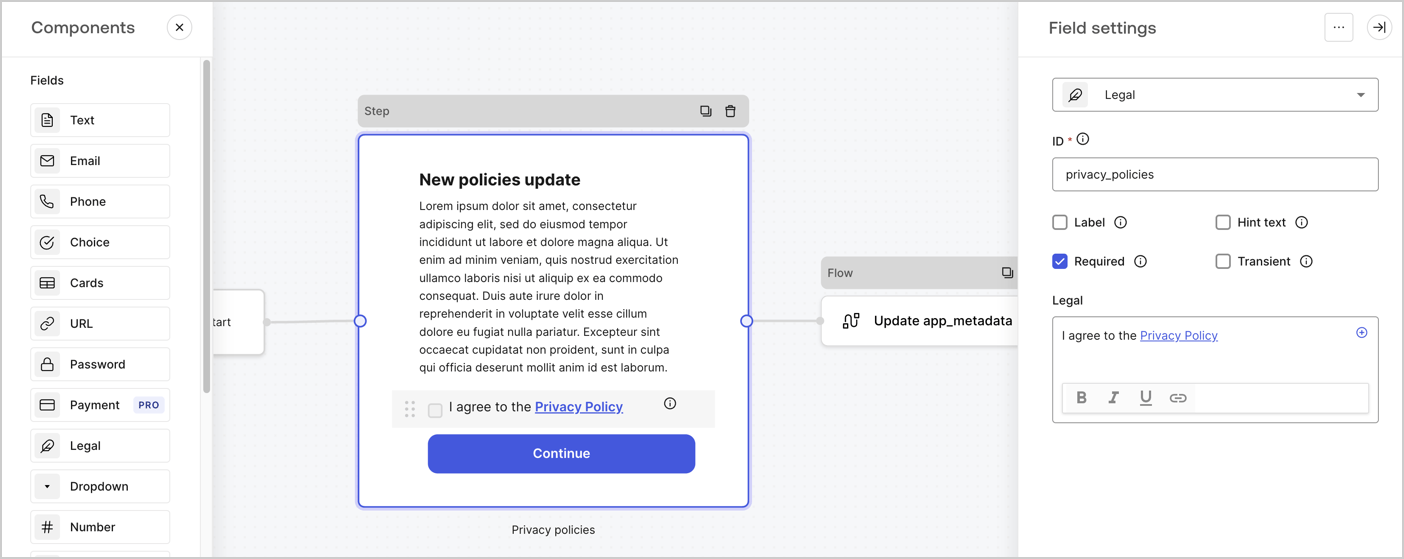
The Step node is the graphical interface visible to users. Add [Fields](/docs/customize/forms/nodes-and-components) to the Step node to collect the new agreement acceptance value by following these steps:

1. Drag a **Rich text** field from the **Components menu** into the **Step** node.

   * **Rich text**: Enter a description of your privacy policies updates.
   * Select **Save**.
2. Drag a **Legal** field into the **Step** node.

   * **ID**: Enter `privacy_policies`.
   * **Required**: Enable the checkbox.
   * **Legal**: Enter `I agree to the Privacy Policy`.
   * Select **Save**.
3. Select **Publish** to save.
<Frame>
  <img src="https://mintcdn.com/docs-staging-fix-details-to-accordion-universal-components/AcXYFIK_zxbPkulg/docs/images/cdy7uua7fh8z/59zFFjQjAnjogkc2QGIqqJ/0ad66b1b636544122aa4e65968b76c2c/privacy-policy-step-node.png?fit=max&auto=format&n=AcXYFIK_zxbPkulg&q=85&s=03f554b54c72e1f330ec8168b1152d02" alt="Dashboard > Actions > Forms > Use case privacy policy step node" data-og-width="1404" width="1404" data-og-height="559" height="559" data-path="docs/images/cdy7uua7fh8z/59zFFjQjAnjogkc2QGIqqJ/0ad66b1b636544122aa4e65968b76c2c/privacy-policy-step-node.png" data-optimize="true" data-opv="3" srcset="https://mintcdn.com/docs-staging-fix-details-to-accordion-universal-components/AcXYFIK_zxbPkulg/docs/images/cdy7uua7fh8z/59zFFjQjAnjogkc2QGIqqJ/0ad66b1b636544122aa4e65968b76c2c/privacy-policy-step-node.png?w=280&fit=max&auto=format&n=AcXYFIK_zxbPkulg&q=85&s=d558eb1d77abf0f631b2c5ae91ffc796 280w, https://mintcdn.com/docs-staging-fix-details-to-accordion-universal-components/AcXYFIK_zxbPkulg/docs/images/cdy7uua7fh8z/59zFFjQjAnjogkc2QGIqqJ/0ad66b1b636544122aa4e65968b76c2c/privacy-policy-step-node.png?w=560&fit=max&auto=format&n=AcXYFIK_zxbPkulg&q=85&s=e382a8abdd623a2a2d5756ef2aab1ddf 560w, https://mintcdn.com/docs-staging-fix-details-to-accordion-universal-components/AcXYFIK_zxbPkulg/docs/images/cdy7uua7fh8z/59zFFjQjAnjogkc2QGIqqJ/0ad66b1b636544122aa4e65968b76c2c/privacy-policy-step-node.png?w=840&fit=max&auto=format&n=AcXYFIK_zxbPkulg&q=85&s=674ece0125287188a5e8fc4823e3f8b0 840w, https://mintcdn.com/docs-staging-fix-details-to-accordion-universal-components/AcXYFIK_zxbPkulg/docs/images/cdy7uua7fh8z/59zFFjQjAnjogkc2QGIqqJ/0ad66b1b636544122aa4e65968b76c2c/privacy-policy-step-node.png?w=1100&fit=max&auto=format&n=AcXYFIK_zxbPkulg&q=85&s=594298b756527a503f585f3464036c33 1100w, https://mintcdn.com/docs-staging-fix-details-to-accordion-universal-components/AcXYFIK_zxbPkulg/docs/images/cdy7uua7fh8z/59zFFjQjAnjogkc2QGIqqJ/0ad66b1b636544122aa4e65968b76c2c/privacy-policy-step-node.png?w=1650&fit=max&auto=format&n=AcXYFIK_zxbPkulg&q=85&s=7269103eb223bea735e759206fe45566 1650w, https://mintcdn.com/docs-staging-fix-details-to-accordion-universal-components/AcXYFIK_zxbPkulg/docs/images/cdy7uua7fh8z/59zFFjQjAnjogkc2QGIqqJ/0ad66b1b636544122aa4e65968b76c2c/privacy-policy-step-node.png?w=2500&fit=max&auto=format&n=AcXYFIK_zxbPkulg&q=85&s=5263992fcaeefd8c30fde3e3ab38a59e 2500w" />
</Frame>

### Configure the Flow node

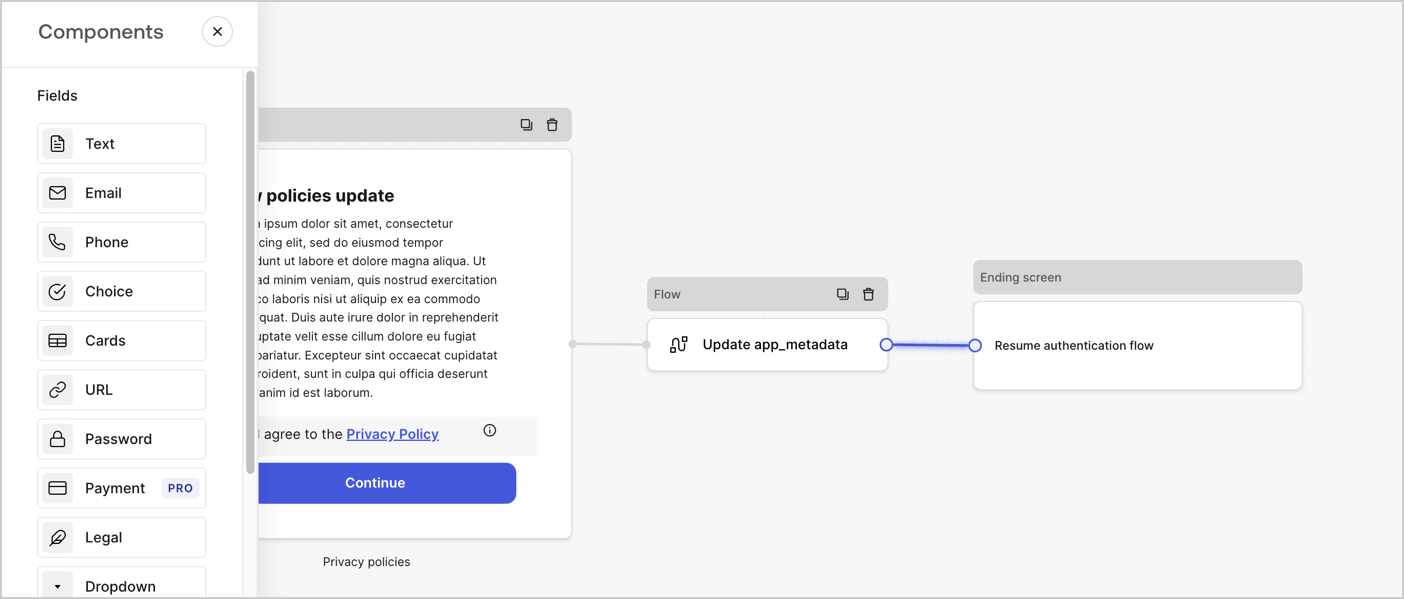
Add a **Flow** node after the **Step** node to update the `app_metadata` and resume the authentication flow by following these steps:

1. Select **Flow** from the bottom of the Form editor.
2. Remove the existing link between the **Step** and **Ending Screen** nodes.
3. Select the new **Flow** > **Click to add a flow** > **Create a new flow.**

   * Enter `Update app_metadata` in the **Name** field.
   * Select **Create**.
   * Select **Save**.
4. Link the **Flow** node to the **Step** and **Ending Screen** nodes as pictured below.
5. Select **Publish** to save.
<Frame>
  <img src="https://mintcdn.com/docs-staging-fix-details-to-accordion-universal-components/hBi-kIKnqSz3KDdt/docs/images/cdy7uua7fh8z/6YIkzm7SrpM9LW76AXuRzh/353c518fe82bbaa440836da1d83596d6/link-policies.png?fit=max&auto=format&n=hBi-kIKnqSz3KDdt&q=85&s=a3300bcf8350f51f650f73051280bac0" alt="Dashboard > Actions > Forms > Form" data-og-width="1404" width="1404" data-og-height="599" height="599" data-path="docs/images/cdy7uua7fh8z/6YIkzm7SrpM9LW76AXuRzh/353c518fe82bbaa440836da1d83596d6/link-policies.png" data-optimize="true" data-opv="3" srcset="https://mintcdn.com/docs-staging-fix-details-to-accordion-universal-components/hBi-kIKnqSz3KDdt/docs/images/cdy7uua7fh8z/6YIkzm7SrpM9LW76AXuRzh/353c518fe82bbaa440836da1d83596d6/link-policies.png?w=280&fit=max&auto=format&n=hBi-kIKnqSz3KDdt&q=85&s=b76c613bfdbe269f368b04ca2917626a 280w, https://mintcdn.com/docs-staging-fix-details-to-accordion-universal-components/hBi-kIKnqSz3KDdt/docs/images/cdy7uua7fh8z/6YIkzm7SrpM9LW76AXuRzh/353c518fe82bbaa440836da1d83596d6/link-policies.png?w=560&fit=max&auto=format&n=hBi-kIKnqSz3KDdt&q=85&s=c72ba39710ae9ddff63f1b7b5c594095 560w, https://mintcdn.com/docs-staging-fix-details-to-accordion-universal-components/hBi-kIKnqSz3KDdt/docs/images/cdy7uua7fh8z/6YIkzm7SrpM9LW76AXuRzh/353c518fe82bbaa440836da1d83596d6/link-policies.png?w=840&fit=max&auto=format&n=hBi-kIKnqSz3KDdt&q=85&s=39b99e8fd54939a175df8f8308fef113 840w, https://mintcdn.com/docs-staging-fix-details-to-accordion-universal-components/hBi-kIKnqSz3KDdt/docs/images/cdy7uua7fh8z/6YIkzm7SrpM9LW76AXuRzh/353c518fe82bbaa440836da1d83596d6/link-policies.png?w=1100&fit=max&auto=format&n=hBi-kIKnqSz3KDdt&q=85&s=0897b1ded5274c0b92ac8f88301d95de 1100w, https://mintcdn.com/docs-staging-fix-details-to-accordion-universal-components/hBi-kIKnqSz3KDdt/docs/images/cdy7uua7fh8z/6YIkzm7SrpM9LW76AXuRzh/353c518fe82bbaa440836da1d83596d6/link-policies.png?w=1650&fit=max&auto=format&n=hBi-kIKnqSz3KDdt&q=85&s=476eaee6e8fa1284ccb12559f0701e1b 1650w, https://mintcdn.com/docs-staging-fix-details-to-accordion-universal-components/hBi-kIKnqSz3KDdt/docs/images/cdy7uua7fh8z/6YIkzm7SrpM9LW76AXuRzh/353c518fe82bbaa440836da1d83596d6/link-policies.png?w=2500&fit=max&auto=format&n=hBi-kIKnqSz3KDdt&q=85&s=1ea89131ff1f77857f3bb1c7ebe3f7df 2500w" />
</Frame>

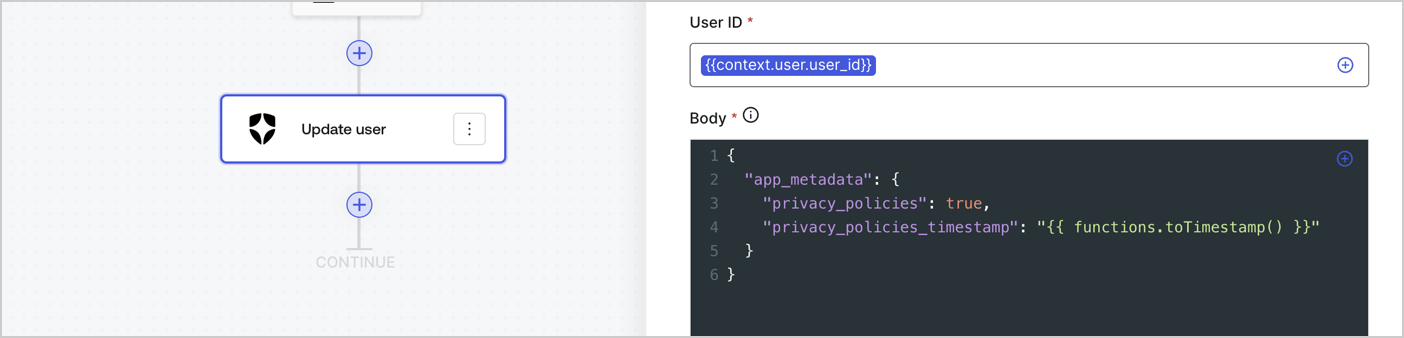
Add an Auth0 Update user action to the flow by following these steps:

1. Select the **Flow** **Update app\_metadata** > **Edit flow** to open the Flow editor in a new tab.
2. Below the StartAction, select the **+** icon to add an **Update user** action. Complete the fields below, then select **Save** to continue.

   * **Connection**: Select from the dropdown the Vault connection to your M2M application.

   * **User ID**: Enter `{{context.user.user_id}}`.

   * **Body**: Copy and paste the following code to update the app\_metadata with the privacy\_policies and privacy\_policies\_timestamp properties.

     ```text lines theme={null}
     {
       "app_metadata": {
         "privacy_policies": true,
         "privacy_policies_timestamp": "{{ functions.toTimestamp() }}"
       }
     }
     ```

   * Select **Save**.
3. Select **Publish** to save.
<Frame>
  <img src="https://mintcdn.com/docs-staging-fix-details-to-accordion-universal-components/93eJSH5mOhIQcvDL/docs/images/cdy7uua7fh8z/CvMNIwWrOUwaFW4X3G28p/1fb70ae57a20749d9ffaaba8dc0b7e26/update-user-privacy.png?fit=max&auto=format&n=93eJSH5mOhIQcvDL&q=85&s=aa05969a5c646fd52b67ebd32ef094af" alt="Dashboard > Actions > Forms > User case privacy policy code" data-og-width="1404" width="1404" data-og-height="338" height="338" data-path="docs/images/cdy7uua7fh8z/CvMNIwWrOUwaFW4X3G28p/1fb70ae57a20749d9ffaaba8dc0b7e26/update-user-privacy.png" data-optimize="true" data-opv="3" srcset="https://mintcdn.com/docs-staging-fix-details-to-accordion-universal-components/93eJSH5mOhIQcvDL/docs/images/cdy7uua7fh8z/CvMNIwWrOUwaFW4X3G28p/1fb70ae57a20749d9ffaaba8dc0b7e26/update-user-privacy.png?w=280&fit=max&auto=format&n=93eJSH5mOhIQcvDL&q=85&s=0656253a853ee73b757ff85065a5b891 280w, https://mintcdn.com/docs-staging-fix-details-to-accordion-universal-components/93eJSH5mOhIQcvDL/docs/images/cdy7uua7fh8z/CvMNIwWrOUwaFW4X3G28p/1fb70ae57a20749d9ffaaba8dc0b7e26/update-user-privacy.png?w=560&fit=max&auto=format&n=93eJSH5mOhIQcvDL&q=85&s=6a9a5254395546069485abc6aa9c8d78 560w, https://mintcdn.com/docs-staging-fix-details-to-accordion-universal-components/93eJSH5mOhIQcvDL/docs/images/cdy7uua7fh8z/CvMNIwWrOUwaFW4X3G28p/1fb70ae57a20749d9ffaaba8dc0b7e26/update-user-privacy.png?w=840&fit=max&auto=format&n=93eJSH5mOhIQcvDL&q=85&s=62b0f73c2984e61151238081901df78d 840w, https://mintcdn.com/docs-staging-fix-details-to-accordion-universal-components/93eJSH5mOhIQcvDL/docs/images/cdy7uua7fh8z/CvMNIwWrOUwaFW4X3G28p/1fb70ae57a20749d9ffaaba8dc0b7e26/update-user-privacy.png?w=1100&fit=max&auto=format&n=93eJSH5mOhIQcvDL&q=85&s=75cb9b33000d0fe0a796a36d95873754 1100w, https://mintcdn.com/docs-staging-fix-details-to-accordion-universal-components/93eJSH5mOhIQcvDL/docs/images/cdy7uua7fh8z/CvMNIwWrOUwaFW4X3G28p/1fb70ae57a20749d9ffaaba8dc0b7e26/update-user-privacy.png?w=1650&fit=max&auto=format&n=93eJSH5mOhIQcvDL&q=85&s=f399d86cc4aa07cdd5b93c46905a1edb 1650w, https://mintcdn.com/docs-staging-fix-details-to-accordion-universal-components/93eJSH5mOhIQcvDL/docs/images/cdy7uua7fh8z/CvMNIwWrOUwaFW4X3G28p/1fb70ae57a20749d9ffaaba8dc0b7e26/update-user-privacy.png?w=2500&fit=max&auto=format&n=93eJSH5mOhIQcvDL&q=85&s=927e8cb8d72fb22013403847ae7d3f8e 2500w" />
</Frame>

<Callout icon="file-lines" color="#0EA5E9" iconType="regular">
  The flow **Update app\_metadata** adds a `privacy_policies true` value to the app`_metadata` object and also generates a timestamp with a [helper function.](/docs/customize/forms/variables)
</Callout>

## Retrieve the form render code

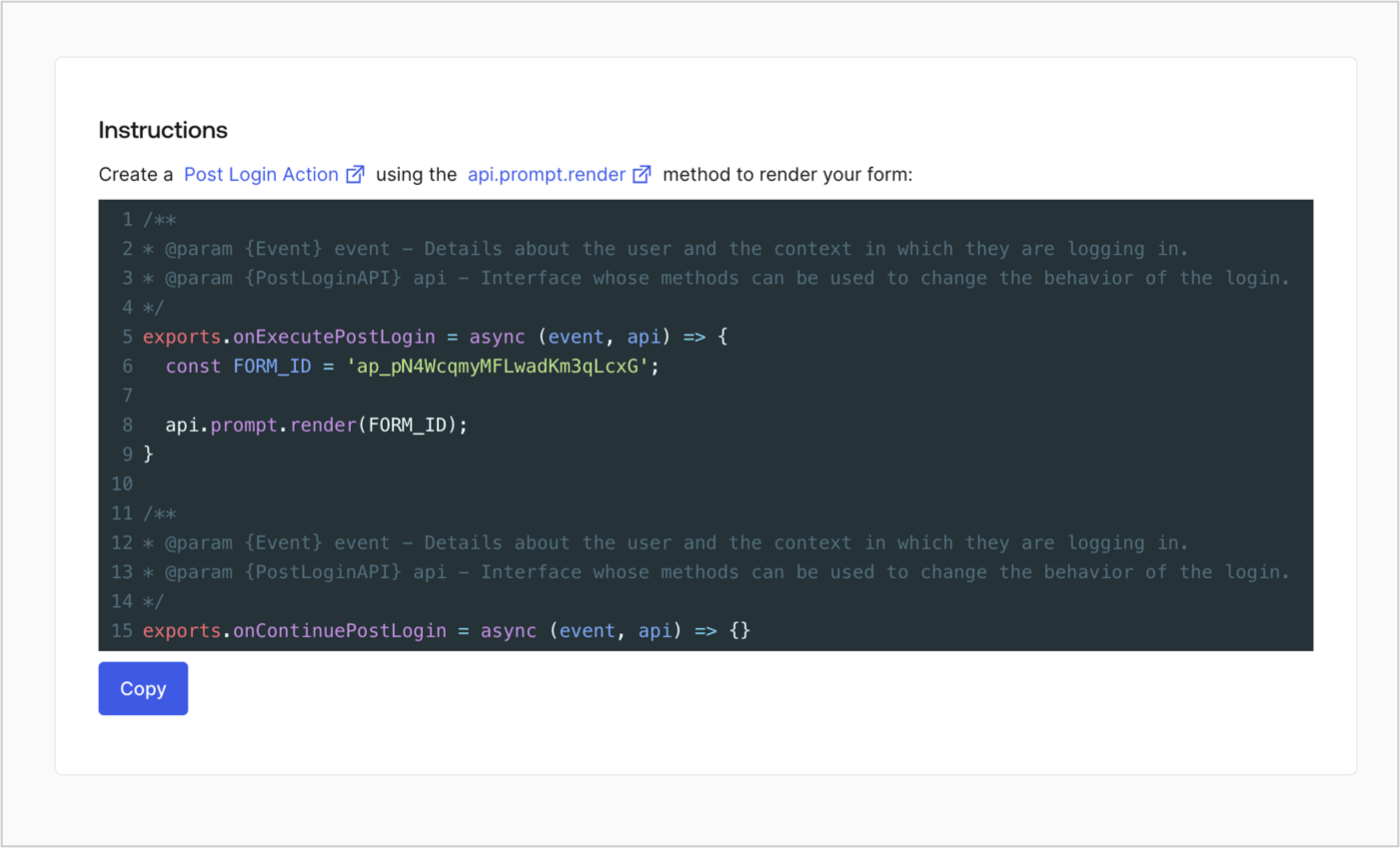
Retrieve your form render code to visually render the form with a custom Post Login Action by following these steps:

* From the Form editor, select **`<> Render`**.
* Select **Copy**.
<Frame>
  <img src="https://mintcdn.com/docs-staging-fix-details-to-accordion-universal-components/d6AiQOi9XnEZ--1T/docs/images/cdy7uua7fh8z/2EIUzc539sq9lwoTKbjoJv/496a864c0fc44a782c9cadca119dbfb0/embed.png?fit=max&auto=format&n=d6AiQOi9XnEZ--1T&q=85&s=0998e043e1e6c4faf44b7c72a9905974" alt="Dashboard > Actions > Forms > Form > Embed" data-og-width="1400" width="1400" data-og-height="848" height="848" data-path="docs/images/cdy7uua7fh8z/2EIUzc539sq9lwoTKbjoJv/496a864c0fc44a782c9cadca119dbfb0/embed.png" data-optimize="true" data-opv="3" srcset="https://mintcdn.com/docs-staging-fix-details-to-accordion-universal-components/d6AiQOi9XnEZ--1T/docs/images/cdy7uua7fh8z/2EIUzc539sq9lwoTKbjoJv/496a864c0fc44a782c9cadca119dbfb0/embed.png?w=280&fit=max&auto=format&n=d6AiQOi9XnEZ--1T&q=85&s=da1c092960c0a7ac7cae697cab9728fb 280w, https://mintcdn.com/docs-staging-fix-details-to-accordion-universal-components/d6AiQOi9XnEZ--1T/docs/images/cdy7uua7fh8z/2EIUzc539sq9lwoTKbjoJv/496a864c0fc44a782c9cadca119dbfb0/embed.png?w=560&fit=max&auto=format&n=d6AiQOi9XnEZ--1T&q=85&s=4587e881f3dba55fbc7816ae081e7dc9 560w, https://mintcdn.com/docs-staging-fix-details-to-accordion-universal-components/d6AiQOi9XnEZ--1T/docs/images/cdy7uua7fh8z/2EIUzc539sq9lwoTKbjoJv/496a864c0fc44a782c9cadca119dbfb0/embed.png?w=840&fit=max&auto=format&n=d6AiQOi9XnEZ--1T&q=85&s=f0a76669e3729b947e12f340f6084a1c 840w, https://mintcdn.com/docs-staging-fix-details-to-accordion-universal-components/d6AiQOi9XnEZ--1T/docs/images/cdy7uua7fh8z/2EIUzc539sq9lwoTKbjoJv/496a864c0fc44a782c9cadca119dbfb0/embed.png?w=1100&fit=max&auto=format&n=d6AiQOi9XnEZ--1T&q=85&s=a9a009bbf9b8290b6172c08b39988ef9 1100w, https://mintcdn.com/docs-staging-fix-details-to-accordion-universal-components/d6AiQOi9XnEZ--1T/docs/images/cdy7uua7fh8z/2EIUzc539sq9lwoTKbjoJv/496a864c0fc44a782c9cadca119dbfb0/embed.png?w=1650&fit=max&auto=format&n=d6AiQOi9XnEZ--1T&q=85&s=f9f76b2776f4451a4747c7710b1f974b 1650w, https://mintcdn.com/docs-staging-fix-details-to-accordion-universal-components/d6AiQOi9XnEZ--1T/docs/images/cdy7uua7fh8z/2EIUzc539sq9lwoTKbjoJv/496a864c0fc44a782c9cadca119dbfb0/embed.png?w=2500&fit=max&auto=format&n=d6AiQOi9XnEZ--1T&q=85&s=d9da404b7708e175dc328a6c751de4b0 2500w" />
</Frame>

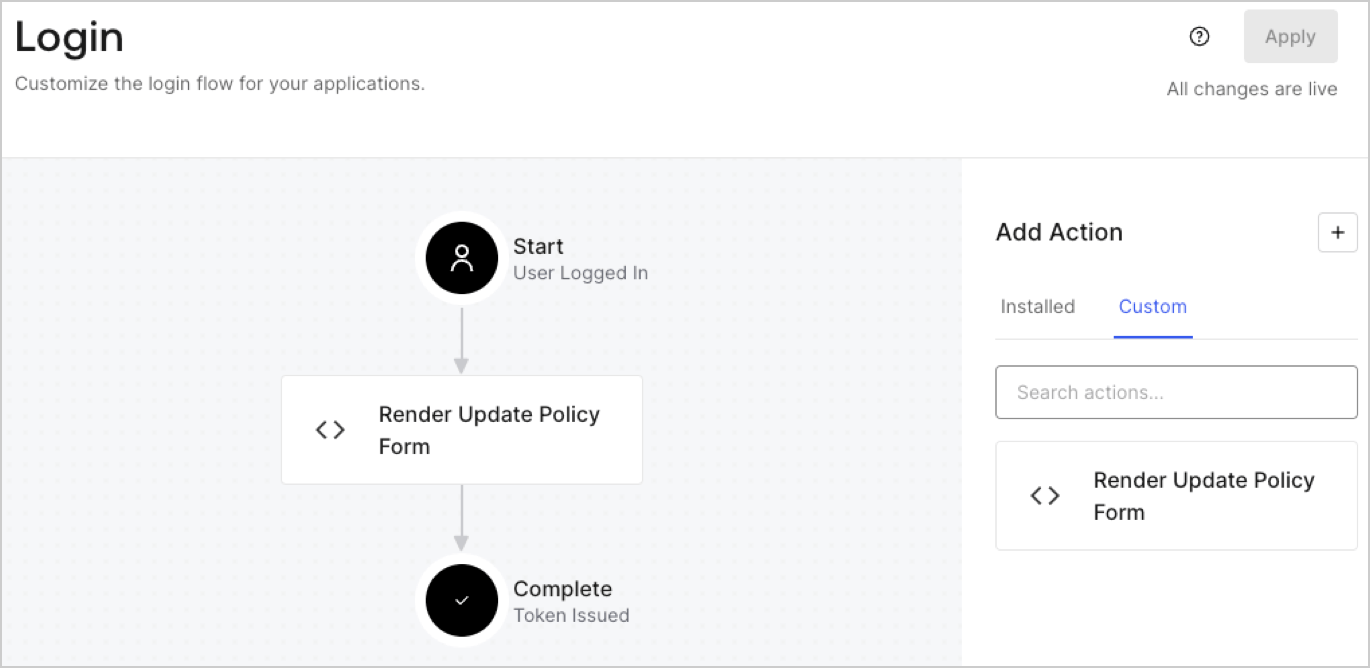
## Create a Post Login Action

Create a post-login Action to render your form by following these steps:

1. Navigate to **Auth0 Dashboard > Actions > Flows > Login.**
2. Select the **+** icon and Select **Build from scratch**:

   * **Name**: Enter `Render Update Policy Form`.
   * **Trigger**: Select `Login / Post Login`.
   * **Runtime**: Select the recommended version.
3. Select **Create**.

To configure the post-login Action:

1. Delete the existing code from the Code editor.
2. Paste the form render code into the Code editor.
3. Edit the code to define the conditional logic that will render the form.

   ```javascript lines theme={null}
   /**
   * @param {Event} event - Details about the user and the context in which they are logging in.
   * @param {PostLoginAPI} api - Interface whose methods can be used to change the behavior of the login.
   */
   exports.onExecutePostLogin = async (event, api) => {
     const FORM_ID = 'REPLACE_WITH_YOUR_FORM_ID';

     if (event.user.app_metadata.privacy_policies !== true) {
       api.prompt.render(FORM_ID);
     }
   }

   exports.onContinuePostLogin = async (event, api) => { }
   ```

   <Callout icon="file-lines" color="#0EA5E9" iconType="regular">
     The example code above will render the form when a user is missing the app metadata `privacy_policies` property.
   </Callout>
4. Select **Deploy.**
5. Drag and Drop the **Render Update Policy Form** Action to the **Login** flow.
   <Frame>
     <img src="https://mintcdn.com/docs-staging-fix-details-to-accordion-universal-components/a22G9h46OmDWI4Qo/docs/images/cdy7uua7fh8z/5TOwDgevZsBqd7yZynUYWU/41ca909dc3007aed4f40ff794a05efa5/postlogin.png?fit=max&auto=format&n=a22G9h46OmDWI4Qo&q=85&s=1ca6e33da489e0dc8a9b0e03f1cb1359" alt="Dashboard > Forms > Use Case > Render update policy form login action" data-og-width="1370" width="1370" data-og-height="668" height="668" data-path="docs/images/cdy7uua7fh8z/5TOwDgevZsBqd7yZynUYWU/41ca909dc3007aed4f40ff794a05efa5/postlogin.png" data-optimize="true" data-opv="3" srcset="https://mintcdn.com/docs-staging-fix-details-to-accordion-universal-components/a22G9h46OmDWI4Qo/docs/images/cdy7uua7fh8z/5TOwDgevZsBqd7yZynUYWU/41ca909dc3007aed4f40ff794a05efa5/postlogin.png?w=280&fit=max&auto=format&n=a22G9h46OmDWI4Qo&q=85&s=c2b880fd2373c5b6b6c9a7c2baaf2501 280w, https://mintcdn.com/docs-staging-fix-details-to-accordion-universal-components/a22G9h46OmDWI4Qo/docs/images/cdy7uua7fh8z/5TOwDgevZsBqd7yZynUYWU/41ca909dc3007aed4f40ff794a05efa5/postlogin.png?w=560&fit=max&auto=format&n=a22G9h46OmDWI4Qo&q=85&s=637a33b13e25507065366e7e07fd466a 560w, https://mintcdn.com/docs-staging-fix-details-to-accordion-universal-components/a22G9h46OmDWI4Qo/docs/images/cdy7uua7fh8z/5TOwDgevZsBqd7yZynUYWU/41ca909dc3007aed4f40ff794a05efa5/postlogin.png?w=840&fit=max&auto=format&n=a22G9h46OmDWI4Qo&q=85&s=6725a9d6cb6a535a427927d9f1e32d2a 840w, https://mintcdn.com/docs-staging-fix-details-to-accordion-universal-components/a22G9h46OmDWI4Qo/docs/images/cdy7uua7fh8z/5TOwDgevZsBqd7yZynUYWU/41ca909dc3007aed4f40ff794a05efa5/postlogin.png?w=1100&fit=max&auto=format&n=a22G9h46OmDWI4Qo&q=85&s=288109d1ff40d86335e57b86267b2ffe 1100w, https://mintcdn.com/docs-staging-fix-details-to-accordion-universal-components/a22G9h46OmDWI4Qo/docs/images/cdy7uua7fh8z/5TOwDgevZsBqd7yZynUYWU/41ca909dc3007aed4f40ff794a05efa5/postlogin.png?w=1650&fit=max&auto=format&n=a22G9h46OmDWI4Qo&q=85&s=ab57f1d156de068c53f6f1a6fe7cd77d 1650w, https://mintcdn.com/docs-staging-fix-details-to-accordion-universal-components/a22G9h46OmDWI4Qo/docs/images/cdy7uua7fh8z/5TOwDgevZsBqd7yZynUYWU/41ca909dc3007aed4f40ff794a05efa5/postlogin.png?w=2500&fit=max&auto=format&n=a22G9h46OmDWI4Qo&q=85&s=7e003b8913e007908310ef2f86ccc7cf 2500w" />
   </Frame>
6. Select **Apply.**

### Test implementation

Test the implementation by following these steps:

1. Log in with an existing user whose app`_metadata` attribute `privacy_policies` does not have a value.
2. The post-login Action in the Login flow will render the form and prompt for acceptance.
3. Select **Auth0 Dashboard > User Management > Users,** locate the user and verify that the `app_metadata` attribute `privacy_policies` contains a `true` value and a timestamp.
